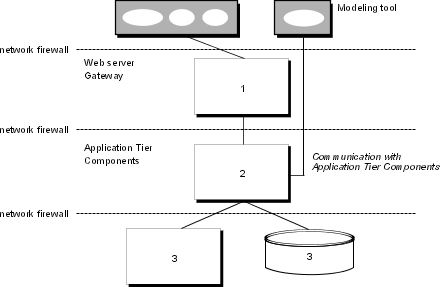
The IBM Cognos 8 modeling tools, Framework Manager, Metric Designer, and Transformer, can be installed either on a computer containing other IBM Cognos 8 components, or on a computer that is separate from these other components.
The modeling tools communicate with the Application Tier Components, which can be installed on one or more Web servers. Modeling tools can communicate with Application Tier Components using one of these routes:
connect to the Application Tier Components dispatcher using the Internal dispatcher URI. This route is the recommended route.
connect to an additional, dedicated gateway that is configured to connect to the dispatcher using the Internal dispatcher URI. You must configure appropriate security for this gateway. This method is useful when the modeling tool is outside a network firewall.
Important: Do not change your main gateway to use the Internal dispatcher URI. Doing so reduces the security of the IBM Cognos 8 portal and studios.
To publish Framework Manager models, Metric Designer extracts, or IBM Cognos 8 Transformer PowerCubes, you must configure the modeling tool to communicate with a dispatcher, either directly or through a dedicated gateway.
To ensure that the modeling tool can communicate with IBM Cognos 8 components, on the computer where the tool is installed, configure cryptographic properties and the following environment properties:
Gateway URI
Dispatcher URI for external applications
For more information, see the Installation and Configuration Guide.
For Web servers other than Microsoft Internet Information Services (IIS), no functional difference exists between the two communication routes between the modeling tool and the Application Tier Components dispatcher. For either route, the modeling tool uses the BI Bus SOAP API. If you use the Web server route, and you have medium-sized and large models (approaching 1 MB in size), the models are broken into smaller pieces (chunked) for transmission.
If you use a Web server other than Microsoft IIS, we recommend that you configure the modeling tool to communicate through your Web server gateway (Route 1). This eliminates the need to set up additional communications channels if you use firewalls to separate the modeling tool, your Web server, and your Application Tier Components.
When the modeling tool is outside a network firewall that protects the Application Tier Components, communication issues with the dispatcher can occur. For security reasons, the default IBM Cognos 8 configuration prevents the dispatcher from accepting requests from the modeling tool when it is outside the network firewall.
By default, the modeling tool is configured to send requests directly to the dispatcher:
To avoid communication issues when communicating directly with the dispatcher, install the modeling tool in the same architectural tier as the Application Tier Components.
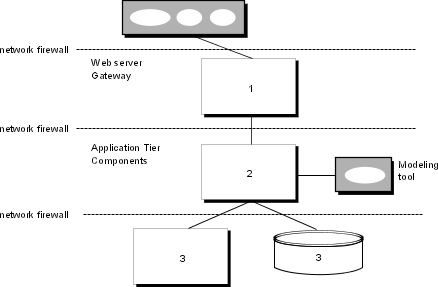
Alternatively, you can install an additional gateway that is dedicated for communication with the modeling tool. You then configure the modeling tool and its gateway such that the dispatcher will accept requests from the modeling tool. In addition to the environment properties that must be configured for the modeling tool, you must configure the Dispatcher URIs for gateway property on the dedicated gateway computer.
