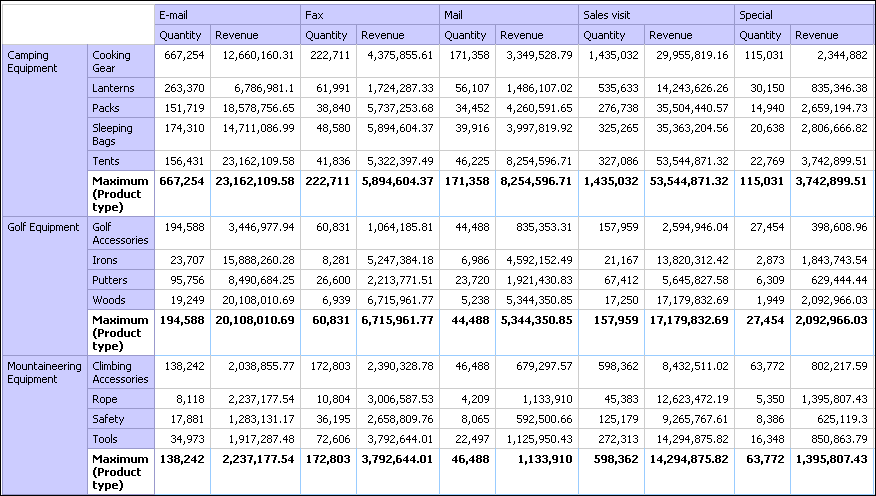
Open Report Studio with the GO Data Warehouse (query) package.
In the Welcome dialog box, click Create a new report or template.
In the New dialog box, click Crosstab and click OK.
In the Insertable Objects pane, on
the Source tab  :
:
Expand Sales and Marketing (query) and Sales (query).
Expand Product and double-click Product line to add it as rows.
Expand Order method and double-click Order method to add it as columns.
Click Product type and drag it just to the right of Product line.
Product type is now nested in Product line.
Expand Sales fact and drag Quantity to the Measures drop zone to add it as a measure.
Drag Revenue to the right of Quantity to add it as a second measure.
Tip: Drop Revenue into the crosstab when you see a vertical bar between the Product type column and the Order method column.
Click any part of the crosstab, and then click the select
ancestor button  in the title bar of the Properties pane.
Click Crosstab.
In the Properties pane, double-click the Font property.
In the Size box, click 8pt and click OK.
Click one of the measures.
Click the aggregate button  and click Maximum.