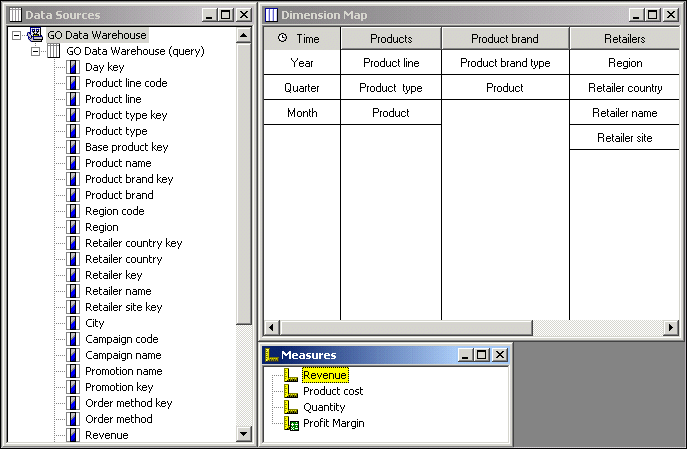
In your Transformer model, you must include the key measures required to gauge the performance of your organization. Quantity of items sold and profit margin are examples of such performance indicators.
A model can contain any number of regular or calculated measures, together with logical groupings that use measure folders. A regular measure is numeric data in a transactional data source. A calculated measure is new numeric data that is derived from other measures, functions, and constants, such as Profit, which is calculated from the measures Revenue and Cost. A measure folder can group existing measures into a logical collection and, if needed, can be assigned a calculated value itself.
In this model, the Measures list contains both regular measures (Revenue, Product cost and Quantity) and a calculated measure (Profit Margin).
To perform calculations on a measure, you create mathematical expressions based on an extensive list of available functions. For more information, see Transformer Functions and IBM Cognos 8 Transformer Expression Editor.
Report users generally want to see their measure data summarized across one or more time periods, such as monthly or quarterly. You can apply different types of rollup to handle these summarizing operations, such as computing the mathematical average or taking the last result.
During the modeling process, you should also confirm how duplicate values are consolidated, and determine if any values need to be allocated to categories, levels, or dimensions that lack a direct association with these values. For more information about these important modeling processes, see Controlling How Measures Roll Up, Consolidation, and Allocating Measures.
You should also confirm the scale and precision settings  for
measures when creating models based on report or package data sources.
Precision settings determine the number of decimal places or significant
digits in your measures. Transformer brings in scale and precision
settings when they are available. However, when these settings are
not available in the report or package query items, values defined
for these settings in the data source may produce unexpected results.
For example, values may produce excessive rounding or values may
not scale correctly when building PowerCubes. In addition to checking
the scale and assigning appropriate precision settings, ensure you
verify that results for query and cube rollup operations in Transformer
are displayed as you expect.
for
measures when creating models based on report or package data sources.
Precision settings determine the number of decimal places or significant
digits in your measures. Transformer brings in scale and precision
settings when they are available. However, when these settings are
not available in the report or package query items, values defined
for these settings in the data source may produce unexpected results.
For example, values may produce excessive rounding or values may
not scale correctly when building PowerCubes. In addition to checking
the scale and assigning appropriate precision settings, ensure you
verify that results for query and cube rollup operations in Transformer
are displayed as you expect.
